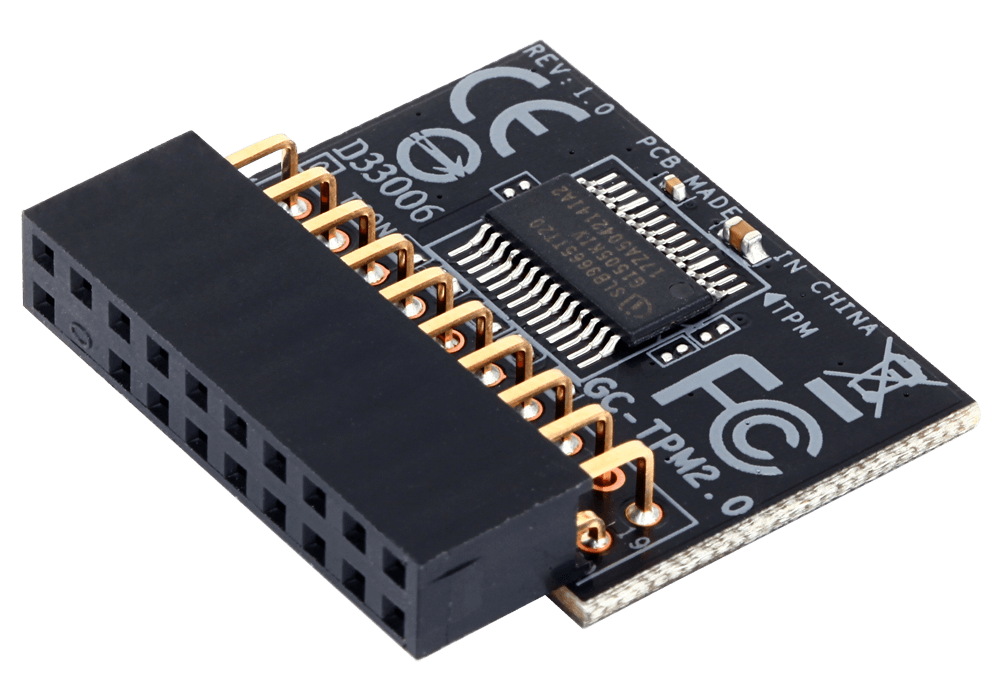
A Trusted Platform Module (TPM) is a security chip on your computer’s motherboard. This chip securely stores cryptographic keys and ensures that your operating system and firmware are authentic and not manipulated.
TPM 2.0 is required for certain features in Windows 11, such as Windows Hello and BitLocker.
How do you check if your computer has a TPM chip?
Follow these steps to check if your computer has a TPM chip:
- Press Windows + R to open the Run dialog box.
- Type tpm.msc and press Enter.
- In the “Manage TPM on the local computer” window, you can see under “Status” whether the TPM is ready for use.
- Under “Information about the manufacturer of TPM” you can check the specification version; for Windows 11 version 2.0 is required.
If you receive the message “Compatible TPM cannot be found” message, TPM may be disabled in the BIOS/UEFI settings.
How do you activate TPM in the BIOS/UEFI?
If TPM is disabled, you can enable it as follows:
1. Restart your computer and press the correct key during startup to open the BIOS/UEFI (see table below).
2. Navigate to the “Security” or “Advanced” tab.
3. Search for “TPM”, “Intel PTT” (for Intel systems) or “AMD fTPM” (for AMD systems) and set it to “Enabled”.
4. Save the changes and leave the BIOS/UEFI.
After enabling TPM, you can perform tpm.msc again to confirm that the TPM is active.
BIOS keys by brand
The test to access the BIOS/UEFI varies by manufacturer. Below is a handy overview:
| Merk | BIOS-toets(en) |
|---|---|
| Acer | F1, F2 of Ctrl + Alt + Esc |
| ASUS | F2 of Del |
| Dell | F2 of F12 |
| HP | Esc of F10 |
| Lenovo | F1 of F2 |
| MSI | Del |
| Toshiba | F1 of Esc |
| Samsung | F2 of F10 |
| Sony | F1, F2 of F3 |
| Gigabyte | Del of F12 |
Please note that the exact test may vary depending on the model. Please refer to your computer’s manual for specific instructions.
More information
For more detailed information on TPM and how to enable it, please refer to the following resources:
- What is a Trusted Platform Module (TPM)? – Microsoft Support
- Enable TPM 2.0 on your pc – Microsoft Support
By enabling TPM, you increase the security of your system. This is essential for features like BitLocker and Windows Hello, and it is additionally a requirement for Windows 11.